Showing posts with label ROA Q. Show all posts

Wednesday, November 2, 2016

Kroger - Follow My Spreadsheet - Mega Sale Ending 11/15/2016


CLICK HERE to view my Spreadsheet for this week.
You may copy it and make changes to your own copy.


Click here to view all the Kroger Savings published in the Facebook group

If you would like me to make changes, add/delete, please comment or message me and I will do my best to do it.

This spreadsheet has a few TABs

  • Shared List - The list of items to purchase = See first picture
    • Cell D2 = Mega Sale Item (buy 5 get $1 etc.)
    • In Cart - Once you purchased you can put Y in this column 
    • T = Transaction, if you want to conduct more than one transactions this is where you can enter the transaction number 
    • Category = the name of the aisle (enter what you want, however it checks it against a list that exists in another tab.
    • Item = the name of the item (you can enter what you want, but it checks it against a list in another tab, so if I know what the retail price is, it will be there).
    • QTY, Retail Price, Sales Price 
    • # of Q1, Description, MFG Q1 <= where you enter your coupons.   if it is a printable coupon you will see a link to the site to print from
    • Final Price is what you will pay in total for the item * quantity
    • % Save, Price per 1 etc.
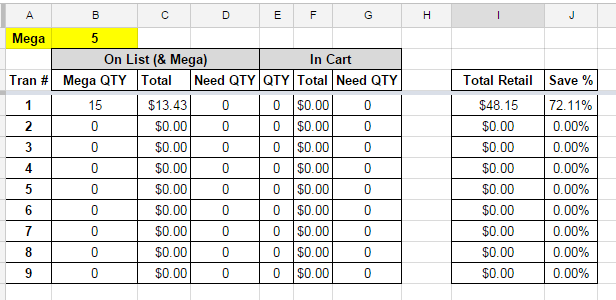
  • Totals - Summary for the sheet - See 2nd picture below
    • Mega - is a copy from the KROGER LIST of how many items in the mega sale
    • Tran # is the total for that transaction number
    • Mega QTY = will let you know how many items you have for the mega sale
    • Total = how much you will pay at the register
    • Need QTY = how many more items you need to meet the mega sale
    • In Cart - will break the same things but for all items that are in your cart (you entered Y in the In Cart column in the KROGER LIST tab.
  • Kroger Prices- A List I compiled of Products and their Retail Price


Thursday, September 29, 2016

Kroger - Follow My Spreadsheet - Week Ending 10/4/2016


CLICK HERE to view my Spreadsheet for this week.
You may copy it and make changes to your own copy.


Click here to view all the Kroger Savings published in the Facebook group

If you would like me to make changes, add/delete, please comment or message me and I will do my best to do it.

This spreadsheet has a few TABs

  • Shared List - The list of items to purchase = See first picture
    • Cell D2 = Mega Sale Item (buy 5 get $1 etc.)
    • In Cart - Once you purchased you can put Y in this column 
    • T = Transaction, if you want to conduct more than one transactions this is where you can enter the transaction number 
    • Category = the name of the aisle (enter what you want, however it checks it against a list that exists in another tab.
    • Item = the name of the item (you can enter what you want, but it checks it against a list in another tab, so if I know what the retail price is, it will be there).
    • QTY, Retail Price, Sales Price 
    • # of Q1, Description, MFG Q1 <= where you enter your coupons.   if it is a printable coupon you will see a link to the site to print from
    • Final Price is what you will pay in total for the item * quantity
    • % Save, Price per 1 etc.
  • Totals - Summary for the sheet - See 2nd picture below
    • Mega - is a copy from the KROGER LIST of how many items in the mega sale
    • Tran # is the total for that transaction number
    • Mega QTY = will let you know how many items you have for the mega sale
    • Total = how much you will pay at the register
    • Need QTY = how many more items you need to meet the mega sale
    • In Cart - will break the same things but for all items that are in your cart (you entered Y in the In Cart column in the KROGER LIST tab.
  • Kroger Prices- A List I compiled of Products and their Retail Price


Wednesday, June 22, 2016

Kroger - Follow My Spreadsheet - 2 Weeks Mega Sale Ending 8/6/2016


CLICK HERE to view my Spreadsheet for this week.
You may copy it and make changes to your own copy.


Click here to view all the Kroger Savings published in the Facebook group

If you would like me to make changes, add/delete, please comment or message me and I will do my best to do it.

This spreadsheet has a few TABs

  • Shared List - The list of items to purchase = See first picture
    • Cell D2 = Mega Sale Item (buy 5 get $1 etc.)
    • In Cart - Once you purchased you can put Y in this column 
    • T = Transaction, if you want to conduct more than one transactions this is where you can enter the transaction number 
    • Category = the name of the aisle (enter what you want, however it checks it against a list that exists in another tab.
    • Item = the name of the item (you can enter what you want, but it checks it against a list in another tab, so if I know what the retail price is, it will be there).
    • QTY, Retail Price, Sales Price 
    • # of Q1, Description, MFG Q1 <= where you enter your coupons.   if it is a printable coupon you will see a link to the site to print from
    • Final Price is what you will pay in total for the item * quantity
    • % Save, Price per 1 etc.
  • Totals - Summary for the sheet - See 2nd picture below
    • Mega - is a copy from the KROGER LIST of how many items in the mega sale
    • Tran # is the total for that transaction number
    • Mega QTY = will let you know how many items you have for the mega sale
    • Total = how much you will pay at the register
    • Need QTY = how many more items you need to meet the mega sale
    • In Cart - will break the same things but for all items that are in your cart (you entered Y in the In Cart column in the KROGER LIST tab.


Wednesday, June 1, 2016

Kroger - Follow My Spreadsheet - 2 Weeks Mega Sale Ending 6/14/2016


CLICK HERE to view my Spreadsheet for this week.
You may copy it and make changes to your own copy.

Click here to view all the Kroger Savings published in the Facebook group

If you would like me to make changes, add/delete, please comment or message me and I will do my best to do it.

This spreadsheet has a few TABs

  • Kroger List - The list of items to purchase = See first picture
    • Cell D2 = Mega Sale Item (buy 5 get $1 etc.)
    • In Cart - Once you purchased you can put Y in this column 
    • T = Transaction, if you want to conduct more than one transactions this is where you can enter the transaction number 
    • Category = the name of the aisle (enter what you want, however it checks it against a list that exists in another tab.
    • Item = the name of the item (you can enter what you want, but it checks it against a list in another tab, so if I know what the retail price is, it will be there).
    • QTY, Retail Price, Sales Price 
    • # of Q1, Description, MFG Q1 <= where you enter your coupons.   if it is a printable coupon you will see a link to the site to print from
    • Final Price is what you will pay in total for the item * quantity
    • % Save, Price per 1 etc.
  • Shopping Total - Summary for the sheet - See 2nd picture below
    • Mega - is a copy from the KROGER LIST of how many items in the mega sale
    • Tran # is the total for that transaction number
    • Mega QTY = will let you know how many items you have for the mega sale
    • Total = how much you will pay at the register
    • Need QTY = how many more items you need to meet the mega sale
    • In Cart - will break the same things but for all items that are in your cart (you entered Y in the In Cart column in the KROGER LIST tab.


Kroger - Juicy Juice - $0.44 (88% Savings)

The Deal
Regular Price = $3.59 
Sale                = $0.99            
Coupon          = $0.55/1 Newspaper 05/22 SS


Pay at Register = $0.44

(if you have ibotta there is a $0.75/1 rebate on Juicy Juice)

FINAL PRICE $1.00 money maker


Tuesday, May 31, 2016

Kroger Mega Sale - June 1st to June 15th!!


Kroger Mega Sale  - June 1st to June 15th!!


Thursday, March 3, 2016

Kroger - Follow My Spreadsheet - 2 Weeks Mega Sale Ending 3/15/2016


CLICK HERE to view my Spreadsheet for this week.
You may copy it and make changes to your own copy.

Click here to view all the Kroger Savings published in the Facebook group

If you would like me to make changes, add/delete, please comment or message me and I will do my best to do it.

This spreadsheet has a few TABs

  • Kroger List - The list of items to purchase = See first picture
    • Cell D2 = Mega Sale Item (buy 5 get $1 etc.)
    • In Cart - Once you purchased you can put Y in this column 
    • T = Transaction, if you want to conduct more than one transactions this is where you can enter the transaction number 
    • Category = the name of the aisle (enter what you want, however it checks it against a list that exists in another tab.
    • Item = the name of the item (you can enter what you want, but it checks it against a list in another tab, so if I know what the retail price is, it will be there).
    • QTY, Retail Price, Sales Price 
    • # of Q1, Description, MFG Q1 <= where you enter your coupons.   if it is a printable coupon you will see a link to the site to print from
    • Final Price is what you will pay in total for the item * quantity
    • % Save, Price per 1 etc.
  • Shopping Total - Summary for the sheet - See 2nd picture below
    • Mega - is a copy from the KROGER LIST of how many items in the mega sale
    • Tran # is the total for that transaction number
    • Mega QTY = will let you know how many items you have for the mega sale
    • Total = how much you will pay at the register
    • Need QTY = how many more items you need to meet the mega sale
    • In Cart - will break the same things but for all items that are in your cart (you entered Y in the In Cart column in the KROGER LIST tab.


Tuesday, February 9, 2016

Saving Star - Bananas!


Bananassssssss are on Saving Star Again!


Looking for more More Posts?   Click HERE

Friday, January 1, 2016

Read This First !


DON'T MISS OUT ON THESE GREAT SAVINGS!


ALL KROGER POSTS

New Savings Star Offer


Bananassssssss


Monday, December 21, 2015

New Saving Star Offer - Freebie - Reese's Peanut Butter Cups


If it's free - It's for me... and you ;)


Wednesday, December 2, 2015

Kroger - Follow My Spreadsheet - 2 Weeks Mega Sale Ending 12/15/2015


CLICK HERE to view my Spreadsheet for this week.
You may copy it and make changes to your own copy.

If you would like me to make changes, add/delete, please comment or message me and I will do my best to do it.

This spreadsheet with show you:

  • How many more items you will need to make a Mega Sale Quantity
    • Enter the quantity of the advertise mega sale in cell H3
    • The spreadsheet will calculate in Cell C2, how many more items you need to add in total, to make the requirement.
  • What is the total amount you will pay, based on what is on your list (Cell G2)
  • As you shop, enter Y in column A, as you put the item in the cart.   The spreadsheet will calculate:
    • The total amount you will pay based on what is in your cart (Cell G3)
    • How many more items you need to put in your cart in order to hit the Mega Sale quantity (Cell C3)
  • Some fun Facts:
    • How many items you will be purchasing - Cell H1
    • How much you paid per item (TOTAL) - Cell H2
    • What is the total % of your Savings - Cell H3
  • Some cool functions:
    • Sort your List By Category (to make it easier to shop)
      • Click on Column S (actually click on the S) and choose Sort A to Z
    • Sort by what you have in your cart and the Category
      • Click on Column T (actually click on the T) and choose Sort A to Z
    • Q SRC - if the Coupon Source is Printable, all you have to do is click the link and it will take you to the actual coupon to print
ROA Couponing

Kroger Buy 4, Save $4 Mega Sale - (2 week sale beginning 12/2)

Kroger Buy 4, Save $4 (2 week sale beginning 12/2)


Have you checked the latest posts on our Facebook Group?
So many great deals!

==> Click HERE for all the Kroger Posts on out facebook group


Tuesday, December 1, 2015

Get Printer Ink Cartridges for Fruction of the Regular Price

Got Ink?


As a couponer you know how much you end up spending on this, so here is a GREAT DEAL for ink.

Follow these steps:

  1. Login/Register to EBATES 
  2. In the search bar type Comp (store name is CompAndSave)
  3. Click on CompAndSave and then click Shop Now
  4. In the CompAndSave website, search for your INK Cartridge 
  5. This is how much they sell my type (HP 02).  Normally I pay over $50 for this set.
    Click add to cart
    Make sure your order is for at least $20
  6. In the Coupon Code Enter: H2S20X20
    Click APPLY

  7. You will receive a $20 discount!!!
    Here is my order with shipping..   NOT TOO BAD!! :)
  8. You should also receive 7% back your EBATE account!!!

Let me know if you need help!

Monday, November 23, 2015

Couponing Meeting Last Sunday - Notes

Thank you Betty for Hosting our Couponing Page

Here are the notes from the meeting, courtesy of Jennifer.


Where to find clearance in each store:
  • Food Lion VintonMarked as closeout on the shelves or in the back of the store near the bathrooms
  • Kroger VintonMarked as closeout on shelves or on the aisle near sodas and canned veggie (need to check aisle #)
  • CVS VintonOn shelves with regular product
  • CVS Bonsack
    On shelves with regular product or sometimes a cart in the front of the store
  • Walmart Market Orange Ave
    Front of the store past all the registers, near pharmacy
  • Walmart Market Dale Ave
    Front of store near registers
  • Kroger Salem
    At back near the meat doors
  • Kroger Crossroads
    Over towards the milk
  • Big Lots
    Within each department there’s a clearance section
Markdown meats: 
  • Food Lion on Tuesdays and
  • Kroger on Friday; 4:00 
  • Kroger Tanglewood Tues, Wed, Fri.  
  • Check for produce markdowns before 10am


What I have in my favorites for couponing:
  • ·         http://yeswecoupon.com/
  • ·         Smartsource.com
  • ·         Coupons.com
  • ·         Pgeveryday.com
  • ·         Southernsavers.com
  • ·         Couponpreview.info
  • ·         Thecouponingcouple.com
  • ·         Thekrazycouponlady.com
  • ·         Krogerkrazy.com
  • ·         Iheartkroger.com
  • ·         Iheartcvs.com
  • ·         www.kelloggsfamilyrewards.com

·          
My favorite stores and why:
  • ·         CVS (Extra Bucks)
  • ·         Kroger (Low prices/mega sales and free Friday downloads)
  • ·         Kmart/Sears (Shop Your way points=free money)
  • ·         Target (Cartwheel in addition to coupons)
  • ·         Walmart (Clearance with coupons=free sometimes)


Target Cartwheel:
Target has a program called Cartwheel that you can save money and it applies in addition to coupons!  Sign up on cartwheel.target.com.  You can use the cartwheel in addition to any manufacturer coupon as well as target coupons for the same item!

Rebate couponing:
These are apps/websites that you can earn money back for purchases in addition to the coupons used.  Some you can link your loyalty card and it will automatically apply and others you will have to scan the item or upload the receipt and get money back.
  • ·         Saving star
  • ·         Ibotta
  • ·         Mobisave
  • ·         Checkout 51
  • ·         Ebates
  • ·         Shrink
  • ·         Receipthog
  • ·         Geoqpons


Fast food Apps:
  • Burger King
  • McDonalds 
  • Hardees takes expired coupons


Penny shopping:
Dollar General (and possibly other stores) have items that will ring up as .01 if you catch the right items at the right times.  We googled some information about it but nobody has tried it themselves yet!  Here is some info we found on pennypup.com.


            Dollar General and a few other stores often offers penny deals. Items usually follow the sale pattern of being discounted 25/40/50/70/90%, then approximately 2-3 weeks after it was marked 90%, it will “penny out”, or be marked a penny in Dollar General’s price system. The trick is to know how to understand the code so you can determine if something is reduced or not. There are things you need to be able to read when it comes to the codes on products.
·         SP – Spring
·         SU – Summer
·         FA – Fall
·         WI – Winter
·         11 – 2011
·         12 – 2012
·         13 – 2013

PLEASE NOTE: All clothing that has pennied is not necessarily listed on this list because the list would be infinitely long if we listed every barcode of every clothing item. Just make sure you match codes/dates on clothing with known penny codes/dates and give it a try! Sometimes they are reset in some areas—just keep looking and keep trying.
We will post the next meeting invitation on facebook.
Join us @https://www.facebook.com/groups/654478137990573/


Wednesday, November 18, 2015

Kroger - Ferrero Rocher $1.79 - Deal Ending 11/24/2015


Summary

Regular Price =  $4.49
Sale                = $3.79
Coupon          =  $2.00 (Click here)


FINAL PRICE for both = $1.79


Details


Kroger - Carnation Evaporated Milk $0.54 - Deal Ending 11/24/2015


Summary

Carnation is on sale for $0.99
Kroger has a digital coupon you can use five times for $0.20 off of 1
Plus there is a printable coupon for $0.55/2 - which you can stack on top of the kroger one.

Regular Price =  $1.89
Sale                = $0.99
Kroger Digital = $0.20/1 (can use 5 times)       
Coupon          =  $0.50/2 (Click here)


FINAL PRICE for both = $0.54


Details


Kroger - Marie Callender's Pie $2.99 and Free Reddi-Wip - Deal Ending 11/24/2015


Summary

GET 1 FREE Reddi-Wip (6.5 oz) When you purchase 1 Marie Callender's Pie

Marie Callender's Pie
Regular Price =  $8.47
Sale                = $3.99          
Coupon          =  $1.00/1 (SS 11/01)

Reddi Wip
Regular Price = $2.99

Sale                = $0.00         
Coupon           =$0.25/1 Click Here


FINAL PRICE for both = $2.74


Details


[Updated] CVS - Follow My Spreadsheet - Black Friday 11/26 to 11/28

CLICK HERE to view my Spreadsheet for this week.
You may copy it and make changes to your own copy.

Updated version 11/18/2015

including up to 5(!) transactions, and weekly email savings.
if you have any questions, please leave a comment below

If you would like me to make changes, add/delete, please comment or message me and I will do my best to do it.

Important:  if the cell is grayed out.  Do not touch it. 

In this Spreadsheet you can:

1. Enter what you plan to buy and decide which transaction you want it on
   Columns A = Transaction Number (you can have up to 5 transactions)
   Columns B to E = Item information
    (If you want to add more lines, make sure you add them BEFORE line 26)
    
2. Enter the EBs for this item (if any) in column H

3.  Enter any Extra Savings you have on your card 
     Note:  *  You can have 2 different Extra Care Savings (Columns I to K and M to O)
                *  You can either put Dollar Savings ($) or Percent Savings (%)
    
4.  Enter any coupons you have
     Note: * You can have 2 different coupons
                  Columns Q to S and U to W
    

For each Transaction you will also have:

  1. Enter EBs on Card (if Any)
    A place to put any other Extra Savings you have on the card (like $5 Beauty Club etc)
    Note: The first like is he total from the two Extra Saving options in the main sheet.
  2. Enter Paper EBs (if Any)
    A place to put any EBs you have, from your last shopping trip, from surveys etc.
  3. EMAIL % of $ Off
    A place to enter additional saving like the ones you get in the weekly email.
    1. Example: $5 off of $15 you will see below is next to the $ sign.
      ==>  it will only apply if the total, after you apply your coupons and EBs is greater or equal to the amount you enter in the wyb $
    2. Example: 20%  off, you will see below is next to the % sign.
      ==>  it will only apply to items in the list that are not on sale.